

 A new website should be a fresh start. Too often, it’s the moment search traffic falls off a cliff.
I’ve seen it happen to businesses of every size. The new site looks great, everyone’s excited on launch day, and then over the next few weeks the enquiries slow down. By the time someone checks Google Search Console, rankings that took years to build have gone.
The good news is that it’s almost always avoidable. Website migrations don’t lose rankings because Google punishes change. They lose rankings because of a handful of predictable mistakes, and every one of them can be planned for.
This guide covers what goes wrong, what to do before, during and after launch, and what to do if your rankings have already dropped. There’s also a checklist at the end you can work through with your developer.
Who it’s for: anyone moving to a new platform (Squarespace or Wix to WordPress, say), redesigning their site, changing domain, merging sites or restructuring their URLs. If any of those are on your 2027 plan, read this before you start.
In short: most migration ranking losses come from missing redirects, lost content or indexing settings. Benchmark first, map every old URL to its closest new page with a 301, check indexing on launch day, then monitor for 30 days. Well-planned migrations usually settle within four to eight weeks.
Why website migrations lose rankings
Google ranks individual pages, not websites. Every page that ranks today has built up signals over time: links from other sites, a history of clicks, and an understanding in Google’s index of what that page is about. A migration puts all of that at risk, because it changes the things Google uses to find and trust those pages.
These are the mistakes I see most often.
1. Missing or wrong redirects. If a page’s address changes and the old URL doesn’t send people (and Google) to the new one with a 301 redirect, everything that page had built up is lost. Visitors from old links and bookmarks hit a 404, and Google drops the page.
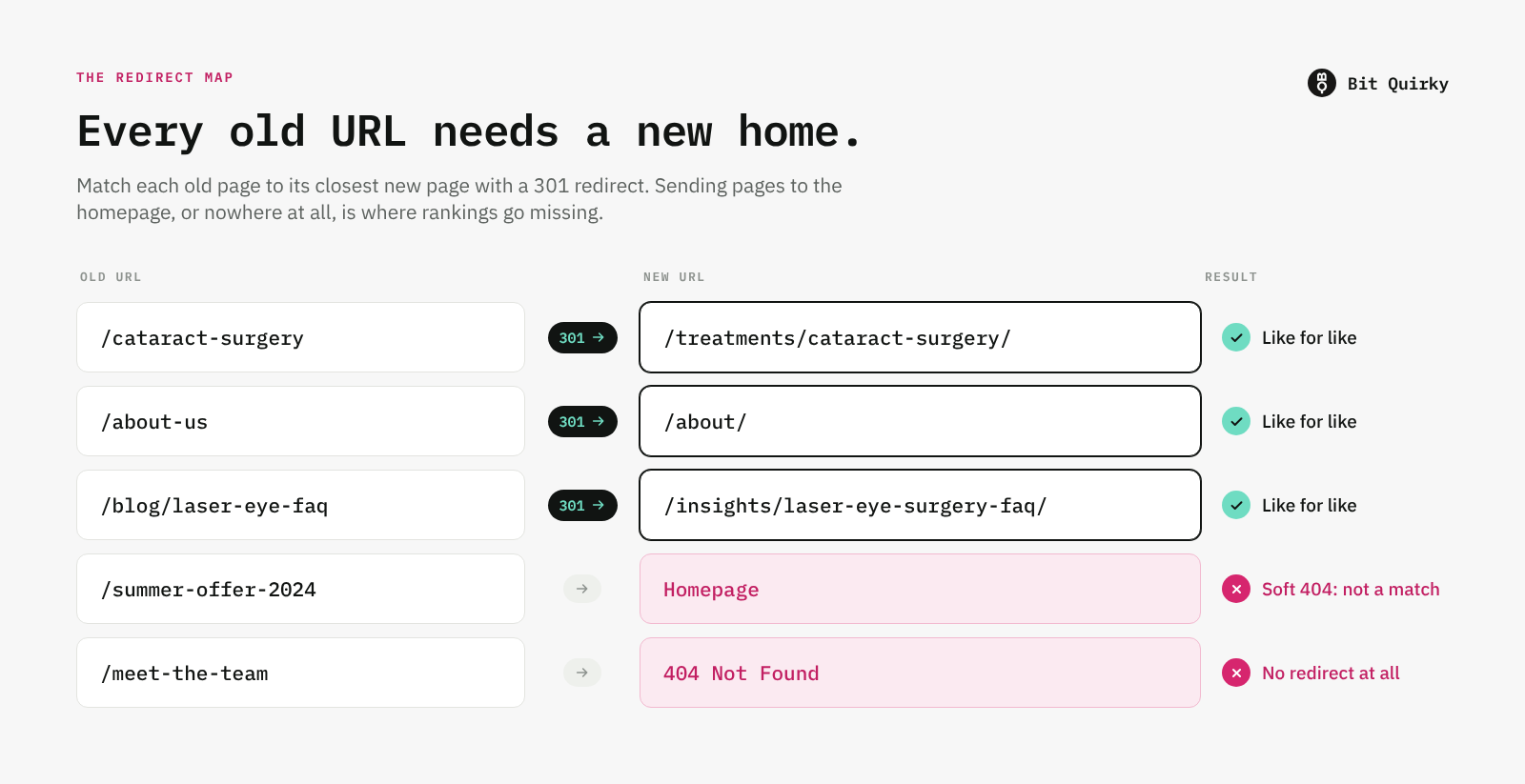
2. Redirecting everything to the homepage. It’s quicker than mapping pages one by one, but Google treats most of these as “soft 404s”. A page about cataract surgery that now redirects to your homepage isn’t a match, so the ranking goes.
3. Content that quietly disappears. Pages get left behind because they “weren’t important”, text gets trimmed to suit a new design, or headings change. If those pages ranked, the rankings go with them.
4. Staging settings left switched on. A “discourage search engines” tickbox or a noindex tag left over from the development site can remove a whole new website from Google within days. It happens more often than anyone admits.
5. Lost metadata and structure. Title tags, meta descriptions, schema, canonical tags and internal links often don’t carry across automatically, especially when changing platform.
6. A slower site. New designs often come with heavier images, more scripts and new plugins. If the new site is noticeably slower, it can hold rankings back.
7. No benchmark. If nobody records how the site performed before the move, it’s very hard to spot what’s dropped afterwards, or to prove what’s gone wrong.
Before you migrate: where most of the work happens
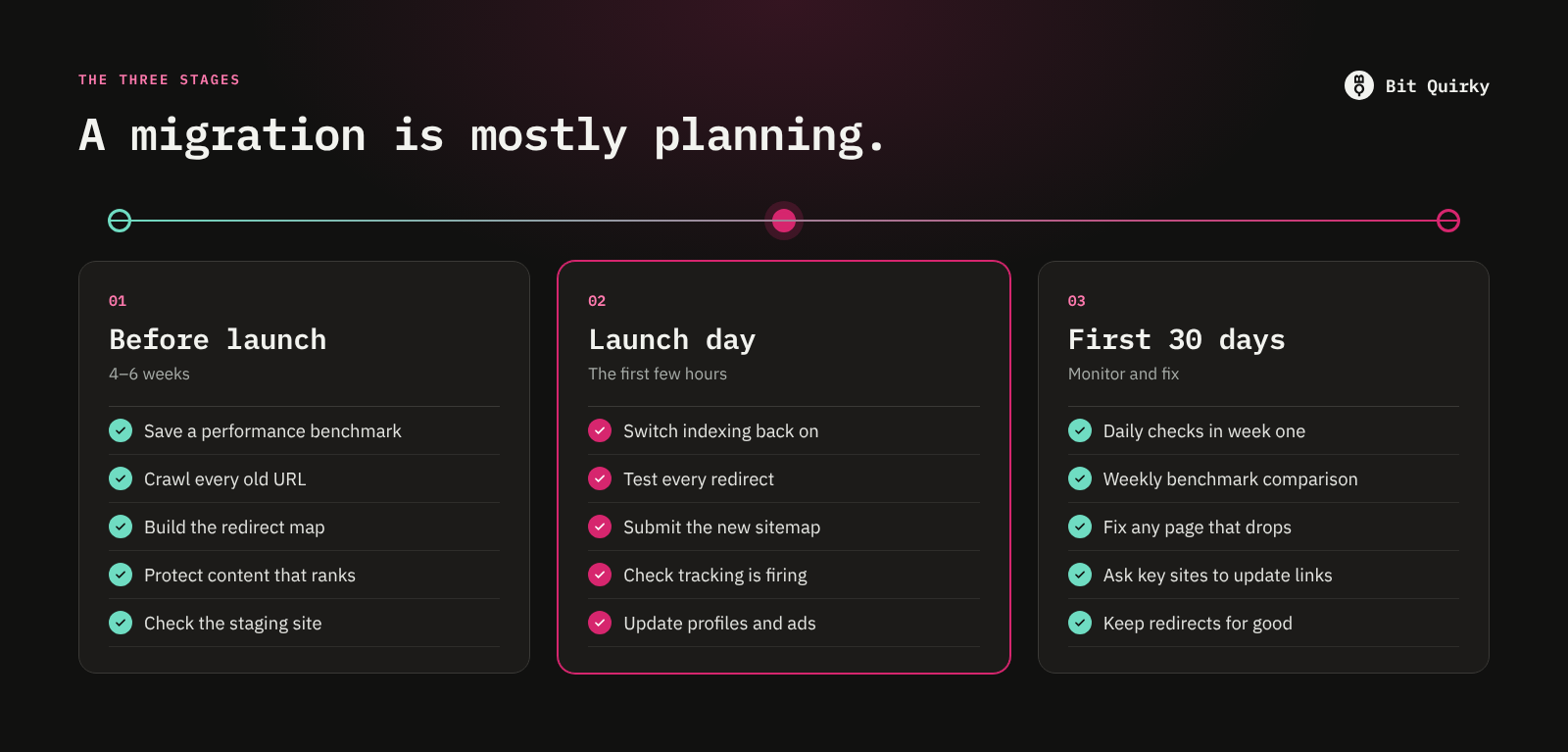
A good migration is mostly planning. Ideally, start four to six weeks before launch and involve whoever looks after your SEO from the beginning, not the week before go-live.
Record a benchmark
Before anything changes, save a snapshot of how the site performs today:
- Clicks, impressions and average position from Google Search Console, for the last three and twelve months
- Your top 50 to 100 pages by organic traffic and by conversions
- The keywords that matter most to the business, with their current positions
- Which pages other websites link to (your backlink tool will show this)
This is your “before” photo. Without it, you’re guessing.
Crawl the current site
Use a crawler such as Screaming Frog or SE Ranking to list every URL on the old site, along with its title, meta description, H1, canonical and status. Don’t rely on the sitemap alone, as it often misses pages.
Build a redirect map
This is the most important document in the whole project. It’s a spreadsheet with every old URL in one column and the best matching new URL in the next.
- Match like for like: each old page goes to its closest equivalent, not the homepage
- Only redirect to a category or parent page when there’s genuinely no equivalent
- Use 301 (permanent) redirects, not 302s
- Avoid chains: old URL goes straight to the final new URL, with no hops in between
Protect the content that ranks
Check your top pages against the new designs. The words, headings and internal links that helped those pages rank should survive the move. If the content has to change, improve it rather than cut it back.
Check the new site before it goes live
On the staging site, check titles, meta descriptions, headings, schema, image alt text and page speed. Make sure staging itself is blocked from Google (password protection is safest), so it doesn’t get indexed as a duplicate.
Pick your moment
Avoid launching in your busiest season, and avoid Friday afternoons. You want people around to fix things in the first 48 hours.
Launch day: the first few hours
On the day the new site goes live, work through these in order:
- Switch indexing back on. Untick “discourage search engines” in WordPress (or your platform’s equivalent), and check there’s no leftover noindex tag or robots.txt block.
- Put the redirects live and test them. Crawl your list of old URLs and confirm every one returns a 301 to the right new page, with no 404s, chains or loops.
- Check the essentials on your key pages. Titles, meta descriptions, canonical tags and schema should all be present on the live site, not just on staging.
- Submit the new XML sitemap in Google Search Console, and make sure it lists only the new URLs.
- If you’ve changed domain, use the Change of Address tool in Search Console.
- Check your tracking. Make sure Google Analytics, Search Console and any conversion tracking are firing on the new site, so you can measure what happens next.
- Update the links you control. Google Business Profile, social profiles, email signatures and any ad campaigns should point to the new URLs, not via redirects.
After launch: the first 30 days
Some movement after a migration is normal. Google has to re-crawl the site, follow the redirects and work out that the new pages replace the old ones. A wobble for a few weeks is expected. A steady slide is not.
Every day for the first week, check Search Console for crawl errors, 404s and pages Google has excluded from the index. Fix anything broken straight away.
Every week for the first month, compare clicks, impressions and positions against your benchmark, page by page. If a page that ranked well has dropped, check its redirect, its content and its title first.
Keep an eye on the old URLs. Search Console will keep reporting old addresses for a while. That’s fine as long as they redirect properly.
Leave the redirects in place permanently. Keep them for at least a year, and ideally for good. Removing them later is a common way to lose rankings a second time.
As a rough guide, most well-planned migrations settle within four to eight weeks. If traffic is still well down after that, something has been missed.
A real example: SEON Vision
SEON Vision is a UK ophthalmology clinic. They needed to move from Squarespace to WordPress, which is exactly the kind of platform change where rankings are most at risk.
Rather than just trying to protect what they had, we used the migration to build a stronger site:
- Every existing page was mapped and redirected to its new equivalent, so no visibility was lost in the move
- Each procedure and each consultant got a dedicated page, written for local search
- Medical schema was added throughout to strengthen trust signals
Comparing March to June 2026 with the same period in 2025:
| Result | Change |
|---|---|
| Organic commercial clicks | +86% |
| Organic impressions | +78% |
| Average position | Page 5 → page 1 |
A migration done well isn’t just damage limitation. It’s one of the best opportunities you’ll get to fix structural problems and come out stronger. Read the full SEON Vision case study.
Already migrated and lost rankings?
If you’re reading this after the event, don’t panic, and don’t start changing things at random. Most post-migration drops can be traced to a short list of causes, and the earlier you find them, the faster rankings come back.
Start here:
- Compare old and new. In Search Console, compare the last 28 days with the 28 days before launch, then look at the Pages tab to see exactly which URLs lost clicks.
- Test the old URLs. Take your old top pages (from an old sitemap, Search Console or the Wayback Machine) and check where each one goes now. Any that return a 404, go to the homepage or pass through several redirects need fixing first.
- Check indexing. In Search Console’s Pages report, look for pages that are “Excluded by noindex”, “Blocked by robots.txt” or “Crawled, currently not indexed”.
- Compare the content. For each page that dropped, compare the old version (the Wayback Machine is useful here) with the new one. Look for lost text, headings, internal links or title tags.
- Check the timing. If Google ran a core update around the same time, some of the movement may not be the migration at all. That changes what you should fix.
If you’d rather have someone find the cause for you, this is exactly what my SEO Sprint is for. In 14 days, I work out what’s gone wrong and why, and you get a prioritised 30-day plan to recover. If you’re still planning your move, an SEO audit before you start is the cheapest insurance you’ll buy.
It’s also worth reading why your SEO isn’t working for the wider causes of falling traffic.
The website migration SEO checklist
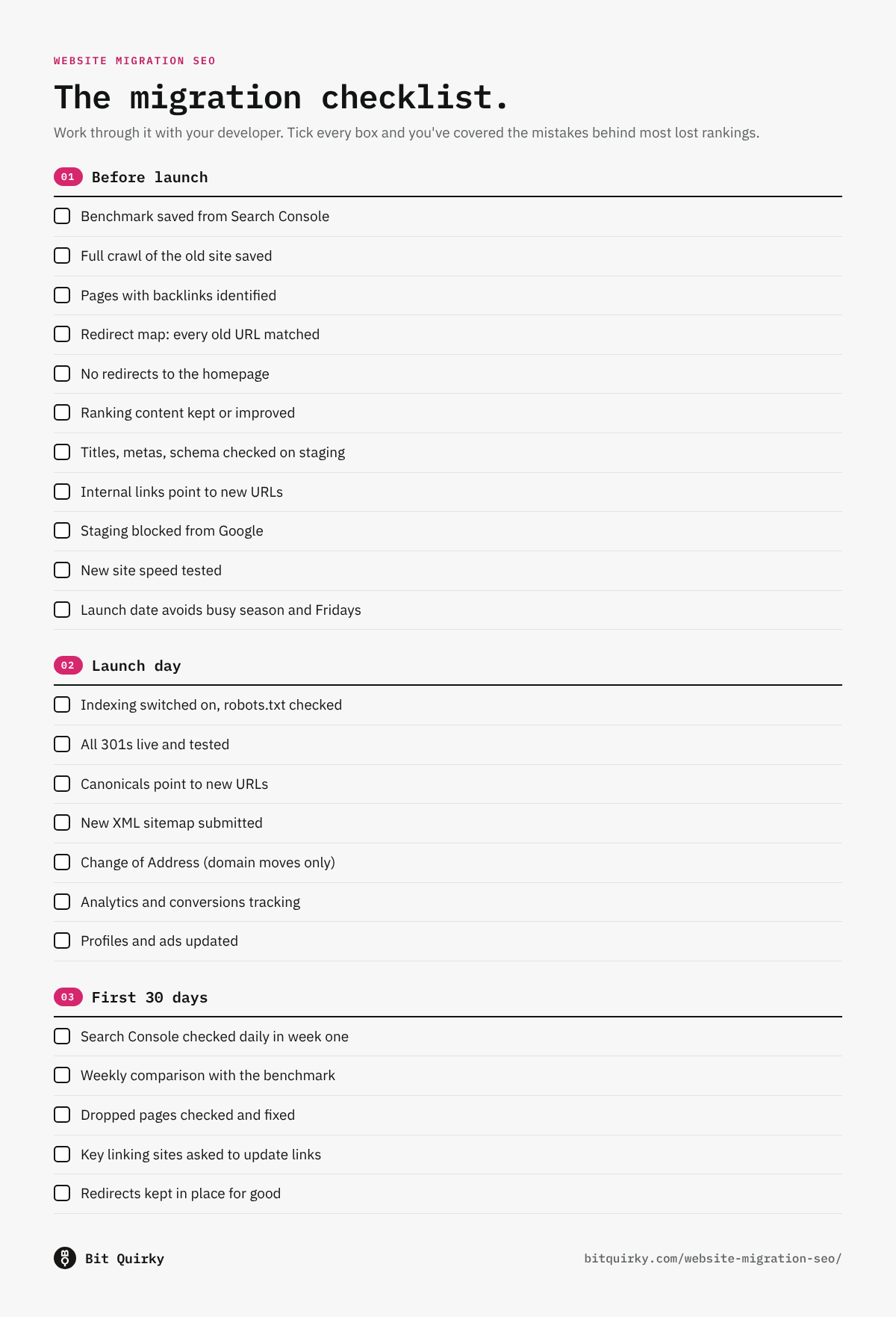 Work through this with your developer. If you can tick every box, you’ve covered the mistakes that cause most migration traffic losses.
Before launch
- Benchmark saved: Search Console clicks, impressions and positions, plus top pages by traffic and conversions
- Full crawl of the old site saved, including every URL, title, meta description and H1
- Pages with backlinks identified
- Redirect map complete, with every old URL matched to its closest new page
- No redirects to the homepage unless there’s genuinely no equivalent
- Content on top pages kept or improved, not cut
- Titles, meta descriptions, headings, schema and alt text checked on staging
- Internal links point to the new URLs, not old ones
- Staging blocked from Google (ideally password protected)
- Page speed on the new site tested against the old one
- Launch date avoids your busiest season and Fridays
Launch day
- Indexing switched on: no noindex, “discourage search engines” unticked, robots.txt checked
- All 301 redirects live and tested, with no 404s, chains or loops
- Canonical tags point to the new URLs
- New XML sitemap submitted in Search Console
- Change of Address submitted (domain changes only)
- Analytics and conversion tracking working
- Google Business Profile, social profiles and ads updated
First 30 days
- Search Console checked daily in week one for errors and excluded pages
- Weekly comparison against the benchmark, page by page
- Any page that’s dropped checked for its redirect, content and title
- Ask the sites that link to you most to update their links to the new URLs
- Redirects kept in place permanently
Website migration SEO: frequently asked questions
Will I lose rankings when I migrate my website?
Not if it’s planned properly. A short wobble of a few weeks is normal while Google re-crawls the site. Lasting drops are almost always caused by missing redirects, lost content or indexing settings, and all of those can be prevented.
How long does it take for rankings to recover after a migration?
Most well-planned migrations settle within four to eight weeks. If traffic is still well below your benchmark after two months, something has usually been missed, and it’s worth investigating rather than waiting.
How long should I keep redirects after a migration?
At least a year, and ideally for good. Other websites will keep linking to your old URLs for years, and removing the redirects throws that value away.
Is it safe to change platform, for example from Squarespace or Wix to WordPress?
Yes. Platform changes are one of the most common reasons to migrate, and they’re a good chance to improve your site structure. The risk comes from the URL changes and lost content that often come with them, so plan the redirect map carefully.
Planning a migration?
The best time to involve an SEO is before the new site is designed, not after it’s launched. A quick conversation now can save months of lost traffic later.
If you’re planning a move, or you’ve already launched and something doesn’t look right, book a free discovery call. I’ll tell you honestly what I’d check first, whether or not you end up working with me.
Tom Edwards is an independent SEO consultant and the founder of Bit Quirky. He has worked in digital marketing and SEO since 2002.
